Friday, 27 June 2008

How to add a comment form beneath your blog posts


Blogger have developed an inline (embedded) comment form which can be enabled through Blogger in Draft. This is probably the most requested feature for Blogger, and I'm sure many of you will want to use this straight away!


To enable inline comments for your Blogger powered blog, you need to log into your dashboard through Blogger in Draft. Then go to Settings>Comments and scroll down the page to see the new "Comment form placement" setting:


Check the radio setting for "Embedded below post" which will enable the display of the comment form below your blog posts.


If you have customized your template, you will need to make a small change to your template code for this comment form to display. But don't worry, it's a very simple customization to make!


Simply go to Layout>Edit HTML in your blog's dashboard and check the "Expand widget templates" box.

Then search for this section of code:


<p class='comment-footer'>
<b:if cond='data:post.allowComments'>
<a expr:href='data:post.addCommentUrl' expr:onclick='data:post.addCommentOnclick'><data:postCommentMsg/></a>
</b:if>
</p>

Replace this entire section of code with the following instead:


<p class='comment-footer'>

<b:if cond='data:post.embedCommentForm'>
<b:include data='post' name='comment-form'/>
<b:else/>
<b:if cond='data:post.allowComments'>
<a expr:href='data:post.addCommentUrl' expr:onclick='data:post.addCommentOnclick'><data:postCommentMsg/></a>
</b:if>
</b:if>

</p>

Then save your template.

Now when you view a post page in your blog, you should see the new comment form in place!


Update: As many of you have pointed out in the comments, not all templates feature the code I've described above.


Luckily, Is has offered a method which is much easier to use, and has worked for every template I've tried so far. So if my original method isn't working for you, try this instead:


Search for this line in your template code:


<b:include data='post' name='comments' />

Immediately after this line, add the following line of code:

<b:include data='post' name='comment-form'/>

Then save your template. This method adds the required code for the comment form without having to alter the whole comment area, and is very useful if you have experienced problems using the original method Thanks for the hint, Is!


If you don't see your comment form, make sure you have changed this setting through Blogger in Draft and have added your code in the correct place in your template.


You can see this comment form in action beneath this post. Using this comment form allows readers to comment using their Google account, OpenID, Name/URL and all of the settings previously available when using a pop-up or full page comment form (depending on the settings you have chosen).


I am very happy to see that Blogger have listened to our requests and have added this great functionality to our blogs. There are also some other new features added to Blogger in Draft including an improved posting page and import/export features which you can read about in the Blogger in Draft blog.


Please let me know what you think of this new feature by leaving your comments below.

Inline comments are available for Blogger blogs!


I'm thrilled to tell you that the Blogger team have enabled a comment form below the post - Wordpress style! This is probably the feature we ALL wanted added to the Blogger service, so many thanks go out to the Blogger team for enabling this service for us.


The inline comment form is currently available through Blogger in Draft. To activate this, go to Settings>Comments in your Blogger dashboard and scroll down to "Comment form placement" where you can check the radio setting for "Embedded below post".


There is only one problem with this at the moment: those of us who have customized our templates cannot currently use this feature. This is because our templates do not contain the code required to display the comment form. If you use a default template, your comment form should automatically appear below your post once you have changed the comment settings in your blog.


I will post about this in full detail in the next couple of hours with instructions for those who have modified their templates. Update: I have now posted full details for adding comment form functionality to your customized Blogger template, and you can also see this in action beneath this (and every) post on Blogger Buster.

Thursday, 26 June 2008

Update: FTP Blogs do publish comment feeds!

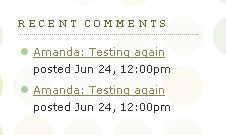
While researching for my previous post, Recent Comments for FTP Bloggers, I had been unable to locate the comments feed for FTP published blogs (and had wrongly assumed that such blogs didn't publish a comments feed!).

Luckily, Pete has confirmed that FTP blogs do publish comment feeds! The URL structure of the feed location is as follows:

http://blogger.com/feeds/[blog-id-number]/comments/default


Where [blog-id-number] is the unique identifier for your blog.

To find your unique blog ID number, simply log in to Blogger and access the dashboard for your FTP published blog.

You can then locate your blog ID by looking in the address bar, where your blog ID will be the long numeric string at the end of the URL:


Copy this number, and replace [your-blog-id] with this number instead. The URL for your FTP blog's comment feed will then be structured like this instead:

http://blogger.com/feeds/8351217949706258294/comments/default


You can use the URL for your comment feed to enable a link for subscribers; to syndicate through Feedburner, or simply to provide a list of recent comments which is drawn from your comments feed.

How to publish recent comments from your FTP blog's comment feed


If you would like to display a list of recent comments in a similar manner to this widget's display, you can use paste the following code into your blog template (be sure to change [your-blog-id] to your unique ID number!):

<script style="text/javascript" src="http://bloggerbuster.com/scripts/comments.js"></script><script style="text/javascript">var a_rc=5;var m_rc=true;var n_rc=true;var o_rc=100;</script>
<script src="http://blogger.com/feeds/[your-blog-id]/comments/default?alt=json-in-script&callback=showrecentcomments"&gt;</script>


By default, this script will display the 5 most recent comments, with a 100 character excerpt from each comment.

If you prefer to display more (or less) than 5 recent comments, you should edit this phrase in the code, replacing "5" with the number of comments you prefer to show:

var a_rc=5;


If you would prefer to show more (or less) of an excerpt for each comment, you should edit this phrase and replace "100" with the number of characters to display:

var o_rc=100;


Note: to display no excerpt at all, you can simply replace "100" with "0".

I hope this update has provided useful information for those publishing their Blogger blogs via FTP. Please accept my apologies for assuming FTP blogs didn't publish comment feeds!

Many thanks go out to Pete for his helpful comment and information.

Celebrate 4th July with the Template Monster Lottery

Template Monster is one of the oldest and best known resources for web designers. To celebrate the upcoming 4th of July, Template Monster has launched a lottery of the best kind: one which rewards everyone who takes part! What's more, by entering this lottery, you are in with the chance of winning an extra special prize too.

To enter this lottery, you need to cast your vote for one of two excellent website templates which will be showcased between now and the 9th of July. The concept is similar to an election: the web design which receives the most votes will be declared the winner. But unlike a regular election, everyone who casts their vote will receive a free themed icon set!


What you could win


Template Monster is offering these great prizes to the lucky winners of the lottery:
  • 1x Voucher to receive any product in the Template Monster database for free
  • 2x Vouchers to receive 80% off any product in the Template Monster database
  • 3x Vouchers to receive a 50% reduction against any product in the Template Monster database.


Template Monster provides website templates; professional business logos; stock photograph images; icon sets; flash templates and much more! Whether you need to create a fully fledged website or simply need to update your blog design, you can be sure one of these prizes would be an excellent prize to win.

Each and every participant in the Template Monster lottery will receive a free icon set, which includes themed images for the 4th July celebrations. If you're looking for some free professional icons to decorate your blog template (or simply to add to a celebratory post) for Independence Day, then it would be worth your while to take part in the lottery. You may also want to check out some of the other patriotic templates available on the site for more examples of inspirational designs.

What's more, if you purchase any product from the database between now and the 9th of July, you will also receive a free icon set!

Template Monster also feature some free web elements, such as clipart, flash buttons and fonts which are well worth checking out if you're on a budget.

Don't forget to enter the lottery before the 9th of July in order to receive your free icon set and be in with the chance of winning a great prize from Template Monster!

Wednesday, 25 June 2008

Poll Results: What readers enjoy most from Blogger Buster

Two weeks ago, I asked Blogger Buster readers to vote for their favorite type of content through an interactive poll.

Overwhelmingly, it seems my posts about customizing Blogger templates are the most popular: this option received 39% of the overall votes (more than double the percentage who voted for Blogger Template downloads!).


Here are the poll results in full:

I'm happy to have conducted this poll as I now realize that my "how-to" style articles are among the most popular and requested from readers as a whole. I was surprised to see that none of the options I'd posted received a huge minority though. Hopefully this means all of the post types I publish here are useful for your needs and interests?

Other suggestions

On the original poll page, some of you suggested other ideas for post content. In particular, Alan suggested a regular "Question and Answer" post (which was seconded by many others in the comments for this post). Thank you Alan, I think this is an excellent idea!

Due to the amount of email I receive, it has become increasingly difficult for me to answer all questions sent by email; using a Q&A feature would enable me to answer some Blogger related questions in a way all readers may benefit from, as my answers will be published on the site.

I plan on posting this Blogger Q&A feature each Monday (beginning next week) so if you have a question about your Blogger blog which you'd like me to answer in Monday's post, please leave me a comment with your question and blog URL below this post. I can't guarantee to answer every question, and will instead focus on the questions which are of the greatest interest to you all.

Another redesign for Blogger Buster..?

In recent weeks, I've received constructive feedback to suggest how the design of this site may be improved. Currently, my templates makes heavy use of scripts and images; these slow down page loading time, and can make reading articles difficult for those browsing with images disabled.

Reader experience of Blogger Buster is of great importance to me. While I do love the current design, I have begun designing a new and improved template which I hope will be much more beneficial to you all.

I'm also considering adding a forum to Blogger Buster, which I feel would add a greater sense of community and interaction to the site. Would you like to see a forum added to the site?

Thank you for your feedback!

Thank you to everyone who voted in the poll, and also to those who offered feedback via comments and email. I truly appreciate all feedback and suggestions for how Blogger Buster may be improved, so don't be shy: tell me what you think!

Don't forget to ask your Blogger related questions for Monday's Q&A post by leaving your comments below.


Tuesday, 24 June 2008

Recent Comments for FTP Bloggers

All blogs which are hosted on Blogger publish a comments feed along with their blogs. But those who choose to publish via FTP to their own hosting account are unable to publish a feed for their comments. Update: FTP blogs do publish a comment feed! I have written a separate post about comment feeds for FTP blogs, which includes the URL structure you should use, and also a script which can be used to display recent comments.

Thanks to Pete for this helpful information!

In this post, I'll explain two different methods you could use to display recent comments in your FTP published Blogger blog without accessing the comments feed.

Method 1: Using template tags to display recent comments from the main page


Blogger recommends making use of template tags to display recent comments in the sidebar of Classic templates.

This is not strictly a list of recent comments, as it can only parse and display comments from the page on which it is displayed.

Therefore, on the home page, this code will display comments which are associated with posts displayed on the home page. More recent comments may have been made on previous posts in the archives, but due to the nature of this code, these comments will not be displayed.

If you would like to make use of this method, you can make use of the following section of code:

<MainPage>
<h2 class="sidebar-title">Recent Comments</h2>
<ul>
<Blogger>
<BlogItemCommentsEnabled>
<BlogItemComments>

<li><$BlogCommentAuthor$> //
<a href="<$BlogCommentPermalinkURL$>">
<$BlogCommentDateTime$></a></li>

</BlogItemComments>
</BlogItemCommentsEnabled>
</Blogger>
</ul>
</MainPage>


Paste this code into the sidebar (or other) section of your blog's HTML code, which can be seen in the Template>Edit HTML section of your blog's dashboard.

This will display a list of the names of commenters, followed by the comment permalink.

If you would prefer to also display the body of the comment in this list, you could use the following section of code instead:

<MainPage>
<h2 class="sidebar-title">Recent Comments</h2>
<ul>
<Blogger>
<BlogItemCommentsEnabled>
<BlogItemComments>

<li><$BlogCommentAuthor$> //
<a href="<$BlogCommentPermalinkURL$>">
<$BlogCommentDateTime$></a>
<p class="comment-body">
<$BlogCommentBody$>
</p>
</li>

</BlogItemComments>
</BlogItemCommentsEnabled>
</Blogger>
</ul>
</MainPage>


This will display the commenter's name and comment permalink followed by the entire body of the comment.

Be careful when using this method, as there is no way to display only a summary of the comment. If readers leave rather long comments on your posts, this will take up much space in the sidebar!

Method 2: Using Storago's Recent Comments Service


Storago provides a useful service to display recent comments which will display a true list of recent comments for those publishing by FTP.

This system works by collecting recent comments posted to your blog, and using JavaScript to display them. Storago collects these comments using Blogger's comment notification by email system. You will need to add a unique Storago email address to your comment notification settings for this to work, and it may take a while for the recent comments to begin displaying in your sidebar.

Here's how you can set up the Storago method to display recent comments in your Blogger FTP blog:

Sign up for your free membership to Storago and wait for your welcome email (mine arrived in about 10 seconds, you you shouldn't be waiting too long!) Once this arrives you can validate your membership and log into your account.'

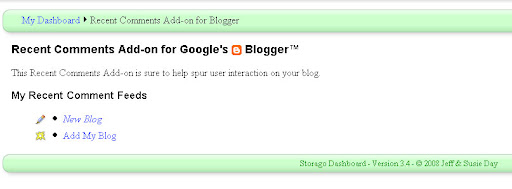
After logging in, you will see a page featuring the tools accessible to you. Choose the "Free recent comments add-on" link.


Then choose to add a new blog.

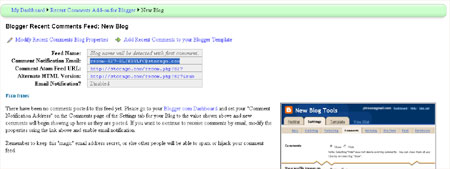
The following page may seem a little confusing as there are no clear instructions of what you should be doing with the information presented:


On this page, you need to copy the "Comment Notification Email" address, which will be something like recom-123-someword@storago.com.

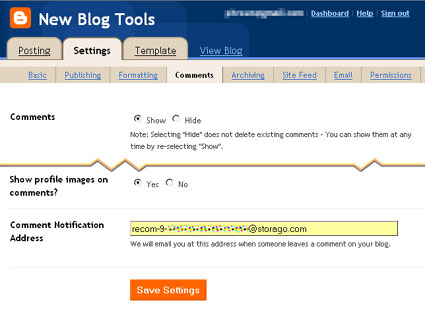
Then go to Settings>Comments in your Blogger dashboard. Add this email address into the comment notification area near the bottom of the page, then save your settings.


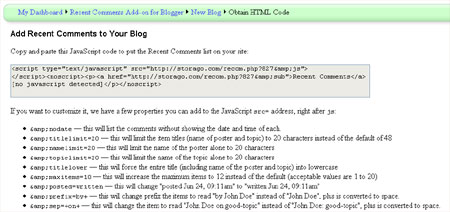
Once you have added the comment notification email address provided by Storago, go back to the Storago page and choose the "Add recent comments to your Blogger template" link. This should bring up a page which looks like this:


You should copy and paste the JavaScript code from inside the gray box into the sidebar section of your blog's HTML code (where you would like this to appear in your design).

By default, the recent comments script is designed to display the commenter's name and the title of the post on which they have commented with the date of the comment beneath.


As far as I can tell, Storago does not allow us to post the body of the comment in the widget. However, we can force the full title and other features by adding code phrases to the JavaScript code (which are detailed on the page where you can find the widget code for Storago).

Comments published on your FTP blog will display in your recent comments widget as soon as they are posted. If you do choose to moderate comments, you will need to approve comments before they are posted in your recent comments widget.

I hope these methods have helped you understand how recent comments may be added to your FTP published Blogger blog without accessing the comments feed.

Please note that this post has now been edited to reflect the information posted by Pete in the comments, and that an update about FTP comment feeds can be read here instead.

Monday, 23 June 2008

Blogger Wishlist Competition Update: What you could win!

Blogger Buster is holding its first competition where you could win the ultimate blogging package by telling us what features you would most like to use in Blogger.

To enter this competition and participate in a community project, please read the original competition post and ensure you validate your entry!

In this post, you can read more about the prizes on offer in this competition, along with some ideas for your own entry based on what others have posted so far.


About the competition

This competition has been launched in celebration of Blogger Buster's first birthday, and is part of a community project to raise awareness of the features which we (the Blogger community) would most like to use in Blogger.

For the chance to win the ultimate blogging package or one of five runner up prizes (see below), you will need to write a post explaining the feature(s) you would most like Blogger to add, then post a comment on the competition page with a link to your entry post.

Be sure to read the entry requirements and rules on the original competition page, and post your entries there!

First Prize: The Ultimate Blogging Package

The main prize on offer in this competition is The Ultimate Blogging Package: a selection of useful products which I have hand picked as the most useful products and services which are tailored to the needs of Blogger users.

The Ultimate Blogging Package includes:

  • A unique, professional Blogger template (which will not be available for public download)

  • A copy of the Problogger book

  • A complete blog tune up

  • One year domain name, email address and basic hosting package from GoDaddy

  • A set of Moo Mini-Cards

  • A one month 125px advertising slot here on Blogger Buster

Here follows a full description of each element in the package:

The Unique Blogger Template

I have designed a unique Blogger template as part of the main prize:

This is one of the best templates I have ever designed! It is based on a new design concept I've been working on for Blogger Buster (more news about this in coming weeks) so you can be sure it is optimized for SEO, loads very quickly and has loads of other great features including built in tabbed navigation (I finally figured out the method!).

This design will only be available to the first prize winner of this competition. It will not be released as a download here at Blogger Buster (either free or paid).

As an extra benefit to the prize winner, I will personally install this template in their blog.

In the event that the winner does not require use of this template for their own blog, the winner will still receive the copyright for this template and are permitted to offer this as a download from their own blog instead. However, I will only install this template into a blog owned or operated by the prize winner themselves.

A complete blog tune up

To complement the Blogger template offered to the winner, I will also provide them with a tune-up for their blog which will further optimize their blog for search engines and ensure it loads as quickly as possible.

This part of the prize is not transferable, and will be provided only to the first prize winner.

A one year domain name from GoDaddy (Includes basic hosting and email)

Blogger users can associate a custom domain (eg: www.yourname.com) with their blog. A domain name purchased directly from GoDaddy comes complete with a basic hosting and email package, allowing extra flexibility for bloggers who need online storage for their images and scripts, and also a professional email address.

The winner of the ultimate blogging package will receive a voucher to purchase the domain name of their choice (.com, .org, .net only), and if required I will help set up their custom domain, hosting and email account (not transferable).

You can read full details of the domain package here.

A copy of the Problogger book

ProBlogger the book is an excellent resource for learning how to build and monetize a successful blog.

Written by Darren Rowse (ProBlogger.net) and Chris Garrett (ChrisG.com), this book is a bestseller of the blogging genre and has received excellent reviews.

Unlike other books that are big on potential and theory, ProBlogger provides results based on the authors own experience of what really works through practical, tried and tested advice.

No matter which genre you write about through your blog, this is an essential book for your reading list!

A pack of 100 Moo Mini Cards

Moo Mini-Cards are a fun and practical way to promote your blog offline. Unlike regular business cards, you can personalize each Moo card in your pack using pre-made templates or your own designs.

This prize includes international shipping, and details will be sent to the winner in the form of a voucher to redeem at Moo.com.

A one month 125px advertising slot here on Blogger Buster

The first prize winner will also win one month's free advertising here on Blogger Buster in the form of a 125px square ad at the top of the sidebar to assist in promoting their blog (worth $30).

5 Runner Up Prizes

As the winners will be drawn purely by luck, I felt it was only fair to offer a small selection of runner up prizes too. So in addition to the ultimate blogging package, five runners up will win:

500 Entrecard Credits

Entrecard is a new and highly useful social network which allows members to earn points which can be used to advertise for free on other members' blogs.

Each runner up will receive 500 Entrecard credits transferred to their account to help towards advertising on other blogs in the network.

One month 30px square advertising slot on Blogger Buster

Each of the five runners up will also receive a one month advertising slot in one of the new 30px square slots which I've introduced to the site.

These slots are currently available through BuySellAds for $10 per month; the size of these ads is similar to a large Favicon and link to your blog (or a page within your blog) using title tags to explain what your site is about.

Ideas submitted so far

If you're looking for ideas for your own entry post to this competition, why not take a look at some of the entries already posted? So far we've seen some really great suggestions, including:

  • The ability to upload images and have them display without size modification (from Theresa of Eyebald)

  • A comment form beneath posts (from Kazi of Free Software for PC)

  • Tabbed navigation built into Blogger templates (from Fernandoo of Randomness)

  • A (purely comical value) instant coffee machine! Thanks to La Blogueria for that one, which really made me smile :D

Your feature suggestion need not be unique! Through this project we are trying to encourage the Blogger team to develop the features which we would find most useful. Writing about these suggestions and promoting through this community project is more likely to make Blogger take notice of our needs and work towards developing these features which can only benefit the community as a whole.

My hope is that the prizes offered through this competition will offer you all more incentive to join in!

How the winners will be chosen

As explained on the main competition page, entrants should write a post on their own blogs about the feature they would most like to use in Blogger. To verify their entry, a comment including the link to their blog post should be made on the competition page.

The competition closes on Friday the 4th of July at 10pm, GMT. Winners will be drawn at random soon after the competition closes using Research Randomizer, with one draw to determine the overall winner and a separate draw for the five runners up.

Winners will first be contacted about their prize and announced later in a follow-up post.

Please be sure to read the full details (including the competition rules) on the main competition page. Entries should be submitted on the competition page only to ensure your entries are verified and included in the draws. Please do not add your entry URL on this page as your entry will not be counted!

Best of luck to you all!

Just to confirm some of the questions asked by readers:

  • Your entry can be in any language, and will be accepted so long as it follows the rules of entry!

  • You must provide a link to your entry post by leaving this in a comment on the main competition page!

Don't forget, this competition closes on Friday the 4th of July at 10pm GMT so be sure to validate your entries before this time!

I wish you all the best of luck for this competition, and look forward to reading more entry posts!

To receive further updates about this competition, and also helpful articles about using Blogger, please subscribe to the Blogger Buster feed.